Huawei API v4.0
IMEI :
Showing posts with label ASUS. Show all posts

Saturday, April 3, 2010

The Best Gaming Laptops Under $1000

Best Gaming Laptop for $550


TOSHIBA Satellite L505-S5995


Specifications:

  • Brand and Model: Toshiba Satellite L505-S5995
  • Screen Size/Resolution: 15.6″, 1366 x 768 WideScreen
  • Video Card: ATI Radeon HD 4570 512MB DDR3
  • Processor: Intel Pentium Dual-Core T4300 (2.10GHz, 800MHz FSB, 1MB L2 Cache)
  • Memory (RAM): 3GB DDR2
  • Hard Drive: 250GB 5400rpm
  • Optical Drive: 24X CD Read/Burn, 8X DVD Read/Burn
  • Connectivity: 802.11 b/g/n Wireless, 10/100Mbps LAN
  • Ports: 3 USB, 1 VGA, 1 E-SATA, SD Cards, Webcam
  • Battery: 4000mAh (6 cell) Lithium Ion
  • Dimensions and Weight: 15.1″ x 10.2″ x 1.4-1.55″, 6lbs
  • Operating System: Windows 7 Home Premium
  • Warranty: Parts and Labor - 1 year limited

About the Toshiba Satellite L505-S5995:

This is the least expensive laptop that is able of handling some video games. Considering the price, don't expect the best looking or the most powerful laptop with tons of accessories, but instead expect an honest laptop with the bare necessities.

The video card limits you to older games and some less demanding recent games, but with lowered details.More information on the Radeon 4570. This laptop is best suited for you if you are very limited on cash and only intend on playing older games or occasionally more recent games that are less demanding.


Pros:
  • Least expensive gaming laptop
  • E-SATA port

Cons:


  • Weak Video Card, limiting you to pretty much only older games or a few recent games that are not too demanding, but with details at the minimum.
  • Low storage capacity (250GB)
  • Only 3GB of RAM
  • Lan limited to 100 Mbps
  • Only 3 USB ports and no HDMI output

Best Gaming Laptop for $650


ASUS K61IC-X2


Specifications:
  • Brand and Model: ASUS K61IC-X2
  • Screen Size/Resolution: 16″, 1366 x 768 WideScreen
  • Video Card: NVIDIA GeForce GT 220M 1GB DDR2
  • Processor: Intel Pentium Dual-Core T4300 (2.10GHz, 800MHz FSB, 1MB L2 Cache)
  • Memory (RAM): 4GB DDR2
  • Hard Drive: 320GB 5400rpm
  • Optical Drive: DVD/CD Burner - SuperMulti
  • Connectivity: 802.11 b/g/n, 10/100/1000Mbps LAN
  • Ports: 4 USB ports, 1 VGA, 1 HDMI, 5 in 1 Card Reader, 1.3MP Webcam
  • Battery: 6 cell Lithium Ion
  • Dimensions and Weight: 14.8″ x 10.24″ x 1.3-1.4″, 5.7lbs
  • Operating System: Windows 7 Home Premium
  • Warranty: 1 year ASUS Accidental Damage Warranty - Drops, Fire, Spill, Surge
  • Parts and Labor - 2 years limited

About the ASUS K61IC-X2: A nice step-up in looks, power and ports. While it is more powerful than the $550 Toshiba laptop, it still limits you to older games or recent games that are not too demanding with lowered details.


Pros:


  • Good Price for the features offered
  • 4 USB ports and HDMI output for your monitor or large HDTV
  • Rather light for a Gaming Laptop
  • ASUS Warranty
  • Unique Cooling System that keeps the laptop cooler and more silent. In simple terms, it uses two fans instead of one.

Cons:


  • Video Card is not powerful enough for modern games.
  • Slow 5400rpm Hard Drive

Best Gaming Laptop for $750


HP Pavilion dv6-1362nr


Specifications:


  • Brand and Model: HP Pavilion dv6-1362nr
  • Screen Size/Resolution: 15.6″, 1366 x 768 WideScreenLED Baclight
  • Video Card: ATI Radeon 4650 1GB
  • Processor: Intel Core 2 Duo T6600 (2.20GHz, 800MHz FSB, 2MB L2)
  • Memory (RAM): 4GB DDR3
  • Hard Drive: 320GB 7200rpm
  • Optical Drive: LightScribe SuperMulti 8X DVD±R/RW
  • Connectivity: 802.11b/g, 10/100/1000 LAN
  • Ports: 4 USB, 1 E-SATA, VGA and HDMI, ExpressCard/54 slot, IR Remote
  • Battery: 6 cell Lithium Ion
  • Dimensions and Weight: 14.90″ x 10.15″ x 1.33″ - 1.61″, 6.34lbs
  • Operating System: Windows 7 Home Premium 64-bit
  • Warranty: Parts and Labor - 1 year limited

About the HP Pavilion dv6-1362nr:

Finally, we have a laptop with a better video card, capable of handling most DirectX 9 games (like Call of Duty 4, F.E.A.R., or Unreal Tournament 3) should be playable in low to medium detail. Demanding DX10 games from 2008 like Crysis run only in low details fluently.

The Mobility Radeon HD 4650 includes the Avivo HD called video technology including an onboard soundchip for 7.1 sound output over HDMI. The Avivo HD technology handles all video tasks and enables the GPU to decode HD videos.

Pros:


  • Decent Gaming Performance thanks to the Radeon HD 4650
  • Nice Looking
  • Faster Hard Drive, at 7200rpm.
  • Remote Control for MultiMedia
  • 4 USB and HDMI output for your monitor or large HDTV
  • 7200rpm Hard Drive

  • Cons:

    No 802.11n wireless

Best Gaming Laptop for $800


ASUS X83VP-X1


Specifications:


  • Brand and Model: ASUS X83VP-X1
  • Screen Size/Resolution: 14.1″, 1280 x 800 WXGA
  • Video Card: ATI Radeon HD 4650 1GB DDR3
  • Processor: Intel Core 2 Duo T6600 (2.20GHz, 800MHz FSB, 2MB L2 Cache)
  • Memory (RAM): 4GB DDR2
  • Hard Drive: 320GB 7200rpm
  • Optical Drive: DVD/CD Burner - SuperMulti
  • Connectivity: 802.11b/g/n, 10/100/1000 LAN
  • Ports:5 USB, 1 VGA, 1 HDMI, 1 eSATA, 8-in-1 card reader, 1.3MP webcam
  • Battery: 6 cell Lithium Ion
  • Dimensions and Weight: 14.52″ x 10.52″ x 1.42″, 5.5lbs
  • Operating System: Windows 7 Home Premium 64-bit
  • Warranty: 1 year ASUS Accidental Damage Warranty - Drops, Fire, Spill, Surge

    Parts and Labor - 2 years limited

About the ASUS X83VP-X1: While this ASUS laptop has the same processor and video card as the previous HP Pavilion dv6-1362nr model, it's more portable due to its smaller size and lower weight.

Like the HP Pavilion dv6-1362nr, it is capable of handling most DirectX 9 games (like Call of Duty 4, F.E.A.R., or Unreal Tournament 3) should be playable in low to medium detail. Demanding DX10 games from 2008 like Crysis run only in low details fluently.The Mobility Radeon HD 4650 includes the Avivo HD called video technology including an onboard soundchip for 7.1 sound output over HDMI. The Avivo HD technology handles all video tasks and enables the GPU to decode HD videos.

Also, it's lower resolution of 1280 x 800 actually gives this laptop the edge for video games performance compared to the HP Pavilion dv6-1362nr. Why? The lower resolution means that the video card doesn't have to work as hard, which in the end means you'll have higher framerates.


Pros:


  • Decent Gaming Performance thanks to the Radeon HD 4650
  • Lower Resolution brings higher framerates
  • 5 USB Ports and HDMI output for your monitor or large HDTV
  • 7200rpm Hard Drive
  • Light for a Gaming Laptop

Cons:


  • DDR2 RAM, draws more power, more expensive to upgrade

Best Gaming Laptop for $970


ASUS X83VP-A1


Specifications:


  • Brand and Model: ASUS X83VP-A1
  • Screen Size/Resolution: 14.1″, 1280 x 800 WXGA
  • Video Card: ATI Radeon HD 4650 1GB DDR3
  • Processor: Intel Core 2 Duo P8700 (2.53GHz, 1066MHz FSB, 3MB L2 Cache)
  • Memory (RAM): 4GB DDR2
  • Hard Drive: 500GB 5400rpm
  • Optical Drive: DVD/CD Burner - SuperMulti
  • Battery: 6 cell Lithium Ion
  • Connectivity: 802.11b/g/n, 10/100/1000 LAN
  • Ports: 5 USB, 1 VGA, 1 HDMI, 1 eSATA, 8-in-1 card reader, 1.3MP webcam
  • Dimensions and Weight: 14.52″ x 10.52″ x 1.42″, 5.5lbs
  • Operating System: Windows 7 Home Premium 64-bit
  • Warranty: 1 year ASUS Accidental Damage Warranty - Drops, Fire, Spill, Surge

    Parts and Labor - 2 years limited

About the ASUS X83VP-A1: In looks, it is identical to the ASUS X83VP-X1. However, inside it contains a much more powerful CPU and is equipped with a larger 500GB Hard Drive, although it is slower at 5400rpm.

In video games, the more powerful processor will help gain a few extra frames per second. However, that doesn't justify spending $170 more, just for that. This laptop is meant for you and worth the extra $170 if, on top of video games, you do some audio/video/3D editing or multi-task a lot.

Pros:


  • Equipped with the more powerful Intel Core 2 Duo P8700 CPU, at 2.53GHz, 1066MHz FSB and 3MB of L2 cache.
  • Decent Gaming Performance thanks to the Radeon HD 4650
  • Lower Resolution brings higher framerates
  • 5 USB Ports and HDMI output for your monitor or large HDTV
  • Light for a Gaming Laptop

Cons:


  • Slow 5400rpm Hard Drive
  • DDR2 RAM, draws more power, more expensive to upgrade

Powered by Zoundry Raven

Sunday, March 14, 2010

The Enthusiast's PC ($1,500)

The Enthusiast's PC


• Excellent performance • Heavy multitasking and everyday computing • Perfect for gaming

The Enthusiast's PC incorporates the perfect blend of both the Entry-Level Rig and Luxury System, making this our most harmonious build. Our intent is to keep this system within the grasp of the average computer enthusiast, essentially offering a fully loaded PC minus some of the unnecessary bells and whistles that could set you back an additional grand or two.

Component
Product
Price
Motherboard
ASRock P55 Pro
$115
Processor
Intel Core i5 750
$200
Memory
OCZ 2x2GB DDR3 1600MHz
$107
Video Card
Radeon HD 5850
$320
Monitor
Asus VH236H 23"
$200
Storage
Intel X25-M 80GB + Western Digital Caviar Black 750GB
$225 + $80
Optical Drive
Sony Optiarc AD-7240S-0B + Lite-On iHOS104-06
$25 + $62
Power Supply
Corsair CMPSU-650TX 650W
$100
Case
Antec Nine Hundred
$100
Sound Card
$90
Speakers
Cyber Acoustics CA3550RB 2.1
$40
Input Devices
Logitech G500 + G15
$57 + $85
Total
$1,834**

**We are admittedly breaking our intended $1,500 price point, but we truly believe an SSD and Blu-ray reader belong in the Enthusiast's PC. Removing these two components brings us well below the $1,500 range.

Processor, Motherboard, Memory

We can't think of a better foundation for this system than Intel's Core i5 750. It's at the perfect price point for the average user and with a little tweaking you can meet or exceed the performance offered by the $590 Core i7 960. The Lynnfield platform offers savings all around. P55-based motherboards are cheaper than your average X58 board, and Lynnfield processors have a dual-channel memory controller, meaning that you will likely save on buying one less RAM module (2x2GB versus 3x2GB for example).

ASRock's P55 Pro has just about anything you might want in a basic motherboard. It supports up to 16GB of RAM at DDR3 2600MHz with overclocking, and it has some useful features including an onboard CMOS reset and power button, an LED POST code display, and CrossFireX (as well as Quad CrossFireX) support. The RAM kit chosen for this build is the same from our Entry-Level Rig.

Graphics, Monitor

The Radeon HD 5000 series is no longer in short supply, so you shouldn't have a problem finding the HD 5850. At the time of writing there were plenty in circulation for considerably more than the list price ($320 vs $260).The 5850 runs cool, fits on most cases and also brings forward-looking technologies like Eyefinity and DirectX 11.

Our selected display steps forward on the size and price of the monitors chosen in the Budget and Entry-Level builds. With 23" of screen at a resolution of 1920x1080, the Asus VH236H will fit many roles, whether you're watching movies, gaming, or just multitasking. Other worthy 24" alternatives are the slightly pricier Samsung T240HD and HannsG HH-21HPB or the harder-to-swallow Dell U2410 which carries an IPS panel.

Storage

In our September update, we tried to squeeze an SSD into the budget, but it just wouldn't fit without major sacrifices -- mainly because of the pricier X58 motherboard and Core i7 920 processor. This time around, there is plenty of headroom for an SSD along with a hefty storage drive.

Although they have suffered from some firmware issues, Intel's X25-M SSDs have been at the top of performance charts from the get-go. The 80GB X25-M should provide ample space for a fresh copy of Windows 7, standard applications and a few games while Western Digital's 750GB Caviar Black houses your media. Make sure the X25-M you order is a second-generation unit, which can be recognized by a "G2" in the model number.

We've chosen to pair a standard DVD burner with Lite-On's affordable Blu-ray reader to give your Enthusiast's PC that extra mile of functionality, but if you want to save $25, feel free to drop the spare drive. Likewise, if you have no use for a Blu-ray reader, exclude it from your purchase.

Power Supply, Case

The 550W Corsair CMPSU-550VX is a great choice for $10 less than our chosen 650W unit, however 550W could be cutting it close on some multi-GPU configurations, so spending more now to have headroom later makes the most sense to us.

Antec's Nine Hundred mid-tower chassis is one of the best selling computer cases in recent times. It features a sturdy steel construction and ships with three 120mm fans as well as one top-mounted 200mm fan. Despite its acclaim, the Antec Nine Hundred is showy, and that's a deal breaker for some folks. For something that looks a bit tamer, see Antec's Three Hundred or Lian Li's cases. There are also a variety of well-priced full tower chassis in circulation, with Sunbeam's Transformer and NZXT's Zero 2 being popular choices.

Audio

Despite its grasp on the computer audio market, Creative's sound cards and drivers have left a bitter taste in the mouths of many. For that reason, we've selected HT Omega's Striker. That said, some users undoubtedly prefer a card that's more mainstream or simply need support for the latest EAX titles, in which case the Creative Sound Blaster X-Fi XtremeGamer should be suitable. There are a variety of 2.1 speaker systems in the $20-$50 price range, but Cyber Acoustics seems to offer the best bargain with a peak power output of 68W and a plethora of solid reviews.

Input Devices

Even if you're not a hardcore gamer, Logitech's G500 mouse is an excellent choice at $57, and the G15 keyboard is somewhat of a de facto among gamers. The G500 is in a sweet spot as far as price for performance goes, but if you need something less expensive, take a look at our Entry-Level Rig. Other gaming-oriented keyboards include OCZ's Sabre OLED

Powered by Zoundry Raven
Friday, March 12, 2010

AMD 890GX Unveiled: Three Motherboards Compared

AMD's chipsets have long provided great features for the money, especially compared to high-end platforms like X48 and X58 from its chief rival, Intel. Everything between the mid-priced (still high-end) 790FX to its more commonplace integrated-graphics products can be attractive, depending on your usage model.

The entire range provides expanded PCIe 2.0 pathways for multi-card configurations, and its integrated-graphics parts actually deliver reasonable 3D performance and an option for multi-monitor support. If you love building productivity-oriented machines at an affordable price or need the ultimate in configurability, AMD might be your best choice. After all, we've yet to be bowled over by Intel's CPU efforts between $100 and $200, while AMD continues to offer a number of compelling quad-core models.


Today's launch focuses on two components, the 890GX northbridge with its revised Radeon HD 4290 graphics engine and the SB850 southbridge. Upgrades include DX10.1 graphics, SATA 6Gb/s, two additional USB 2.0 ports, and integrated gigabit networking.

But our emphasis here is on a trio of motherboards emerging alongside the new core logic from Asus, Gigabyte, and MSI. Note that you'll see USB 3.0 support in the pages to come. However, the 890GX platform does not natively support USB 3.0; rather, it's added via an on-board controller.

Motherboard Features


890GX Motherboard Features

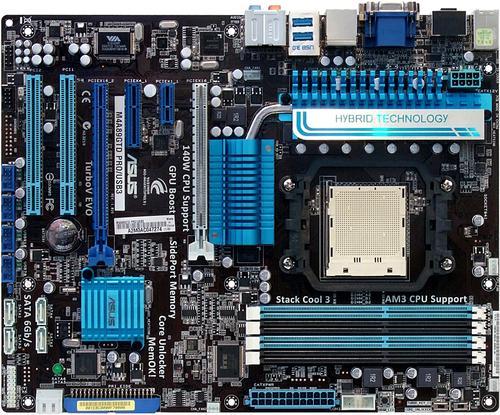
Asus M4A89GTD
Pro/USB3
Gigabyte
890GPA-UD3H
MSI
890GXM-G65
PCB Revision
1.01G
1.0
1.0
Chipset
AMD 890GX/SB850
AMD 890GX/SB850
AMD 890GX/SB850
Voltage Regulator
Ten Phases
Five Phases
Five Phases
BIOS
0402 (02/09/2010)
F3 (02/08/2010)
V1.0B18 (02/22/2010)
200.0 MHz BCLK
200.7 MHz (+0.35%)
200.0 MHz (+0.0 MHz)
Clock Generator
ICS 9LPRS477CKL
Realtek RTM880N-793
Realtek RTM880N-793
Sideport DRAM
H5TQ1G63BFR-12C
128MB DDR3-1600
H5TQ1G63BFR-12C
128MB DDR3-1600
H5TQ1G63BFR-12C
128MB DDR3-1600
Internal Interfaces
PCIe x16
2 (x16/x0, x8/x8)
2 (x16/x0, x8/x8)
2 (x16/x0, x8/x8)
PCIe x1/x4
1/1
3/0
1/0
Legacy PCI
2
2
1
USB 2.0
4 (8-ports)
4 (8-ports)
4 (8-ports)
IEEE-1394
1
2
None
Serial Port
1
1
1
Parallel Port
None
None
1
Floppy
No
Yes
No
Ultra-ATA 133
1 (2-drives)
1 (2-drives)
1 (2-drives)
SATA 3.0 Gb/s
None
None
None
SATA 6.0 Gb/s
6
6
5
4-Pin Fan
2
2
1
3-Pin Fan
2
2
1
FP-Audio
Yes
Yes
Yes
CD-Audio
No
Yes
Yes
S/PDIF I/O
Output Only
Both
Output Only
Power Button
No
No
No
Reset Button
No
No
No
CLR_CMOS Button
Jumper Only
Jumper Only
Jumper Only
Diagnostics Panel
Pass/Fail LEDs
Pass/Fail LEDs
Pass/Fail LEDs
I/O Panel Connectors
P/S 2
1
1
1
USB 2.0
4
4
4
USB 3.0
2
2
2
IEEE-1394
1
1
None
Network
Single
Single
Single
eSATA
1
None
1
CLR_CMOS Button
No
No
No
Digital Audio Out
Optical
Optical
Optical
Digital Audio In
None
None
None
Analog Audio
6
6
6
Video Outputs
DVI, HDMI, VGA
DVI, HDMI, VGA
DVI, HDMI, VGA
DVI Dual Link
Yes
Unverified
Yes
Dual Monitor
Yes
Yes
Yes
Mass Storage Controllers
Chipset SATA
6x SATA 6Gb/s
6x SATA 6Gb/s
6x SATA 6Gb/s
Chipset RAID Modes
0, 1, 5, 10
0, 1, 5, 10
0, 1, 5, 10
Add-In SATA
JMB361 PCIe
1x eSATA 3.0 Gb/s
JMB363 PCIe
1x eSATA 3.0 Gb/s
None
Add-In Ultra ATA
JMB361 PCIe
JMB363 PCIe
JMB368 PCIe
USB 3.0
NEC D720200F1
NEC D720200F1
NEC D720200F1
IEEE-1394
VT6308P PCI
2x 400 Mb/s
TSB43AB23 PCI
3x 400 Mb/s
None
Gigabit Ethernet
Primary LAN
RTL8111E PCIe
RTL8111D PCIe
RTL8111DL PCIe
Secondary LAN
None
None
None
Audio
HD Audio Codec
ALC892
ALC892
ALC889
DDL/DTS Connect
Unspecified
Dolby Digital Live
Unspecified

AMD's multi-monitor advantage comes from the way it separates PCIe and GPU functions to deliver sixteen PCIe 2.0 lanes to graphics cards (up to two) without sacrificing integrated graphics functionality. Its Catalyst driver package controls both onboard and discrete Radeon graphics controllers simultaneously, seamlessly managing multiple desktop configurations. The three boards in today's roundup have another advantage over those of our recent H55 comparison, in that those products didn't support DVI dual-link mode for extra-large displays.

Unfortunately, while Gigabyte's dual-link mode appeared to accommodate our lab's 2560x1600 display, loading the driver seemed to break this feature. This is most likely a driver bug, since AMD's Catalyst 10.3 Preview package is not yet finished.


Another advantage today's motherboards have over the Intel H55-based competition is the chipset's additional PCIe 2.0 lanes, one of which supplies each of today's motherboards with the same USB 3.0 controller at its full 5.0 Gb/s interface bandwidth. Intel's chipset lanes run at half-speed, so that two lanes and a costly PCIe switch are required to reach the controller's maximum throughput.

Asus M4A89GTD Pro/USB3


Asus' full-sized board provides the extra space needed to access most 890GX chipset functions, including two of the chipset's six PCI slots and five of its eight PCIe 2.0 lanes. Much of the chipset's remaining connectivity is tied to on-board controllers.


Only four of the chipset's USB 2.0 ports are found on the I/O panel, as the area is far too laden with other connections to allow for more. Two USB 3.0, FireWire, eSATA, digital and analog audio, gigabit networking, and triple-format display output round out the rear.


Builders looking for the best performance from a single card need to pay close attention to the included VGA switch card, which is used to control the number of lanes fed to the dark-blue slot. Sixteen lanes are shared across two graphics card slots in x8 mode, but placing the card into the light-blue slot redirects its eight lanes to the dark-blue slot for full x16 connectivity to a single card. This low-cost switching method eliminates the need for more expensive devices, such as the electronic switches used by its competitors.


Four USB 2.0 headers support up to eight front-panel ports or devices, but the add-in ATA controller supports only Ultra ATA drives. All ATA connectors including the chipset's six SATA 6Gb/s ports are found near the bottom edge, which could make cable installation difficult for the top-bay drives in mid-tower cases.


Front-panel audio is found in its usual bottom-rear-corner position, where it will usually be difficult to reach with the cables of top-bay connections.

BIOS


Reference Clock
100-600 MHz (1 MHz)
CPU Multiplier
Yes
iGFX Clock
400-1500 MHz (1 MHz)
DRAM Data Rates
REF x4-x8 (x1.33)
PCIe Clock
100-150 MHz (1 MHz)
CPU Vcore
0.65-2.05V (3.125mV)
IMC Voltage
0.4-1.8V (3.125mV)
890GX Voltage
0.8-2.0V (6.25mV)
SB850 Voltage
1.10-1.40V (50mV)
DRAM Voltage
1.20-2.50V (6.25mV)
CAS Latency
4-12 Cycles
tRCD
4-12 Cycles
tRP
5-12 Cycles
tRAS
15-30 Cycles

The M4A89GTD Pro/USB3 provides a fairly long list of overclocking controls, supporting even sideport memory overclocks (DDR3-1333 to DDR3-2000) and over-voltage (from 1.50 to 1.80 volts).


A fairly short selection of DRAM timings still provides all the settings most tuners will need.


Asus is proud of its Core Unlocker feature, which is meant to enable the disabled cores of Phenom II X2 and X3 processors. This is notable since the SB850 southbridge does not include ACC as a built-in feature. Nevertheless, while we've had minor luck randomly unlocking a handful of retail-purchased CPUs, we wouldn't recommend you buy a cheaper processor hoping for an unlock when you really want the higher-end CPU. It's not like we're dealing with the difference between a Core i5-750 and a Core i7-975 Extreme or anything, cost-wise.


Asus includes four SATA cables with its M4A89GTD Pro/USB3, but only two are marked as SATA 6 Gb/s capable.

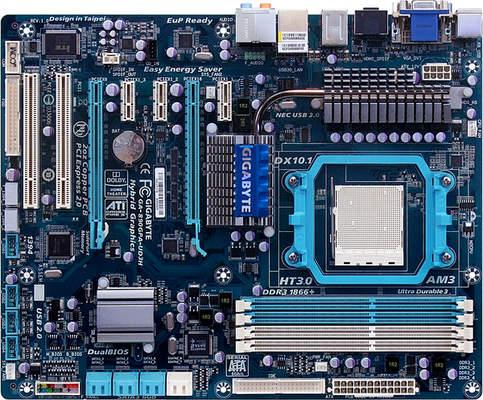
Gigabyte GA-890GPA-UD3H


Gigabyte's first entry into the 890GX world comes with a few extra features compared to chief-rival Asus, with a full seven expansion slots, automatic PCIe x16 to dual x8 slot switching, and an added SATA connection.


Except for its missing eSATA port, the 890GPA-UD3H I/O panel could have been lifted directly from the Asus board. Gigabyte seems to be of the opinion that most eSATA users would rather connect their devices via the front panel ports of select cases, placing both additional connections internally. Two USB 3.0 ports highlight the I/O panel's added features.


BIOS


Reference Clock
200-500 MHz (1MHz)
CPU Multiplier
Yes
iGFX Clock
200-2000 MHz (1 MHz)
DRAM Data Rates
REF x4-x8 (x1.33)
PCIe Clock
100-150 MHz (1MHz)
CPU Vcore
-0.6 to +0.6V (25mV)
IMC Voltage
-0.6 to +0.6V (25mV)
890GX Voltage
0.90-1.60V (20mV)
SB850 Voltage
Not Adjustable
DRAM Voltage
1.28-2.45V (15mV)
CAS Latency
3-11 Cycles
tRCD
3-15 Cycles
tRP
3-15 Cycles
tRAS
3-31 Cycles

Overclockers will love the variety of configurable settings provided in Gigabyte's GA-890GPA-UD3H BIOS. We prefer to see actual (rather than offset) voltage listed, but Gigabyte makes it easy to see "where you're going" by also listing the expected result.


Memory timing selections are only mildly advanced beyond the basic overclocker's needs, but do include drive-strength control.


Eight custom BIOS configurations can be saved in a protected area of the BIOS IC as user profiles.


Users who forget to save a user profile in BIOS can still retrieve previous settings, since the motherboard automatically retains the "last known good" configuration.

Accessories


We were disappointed to find only two SATA cables in Gigabyte's installation kit, though retail samples might contain more.

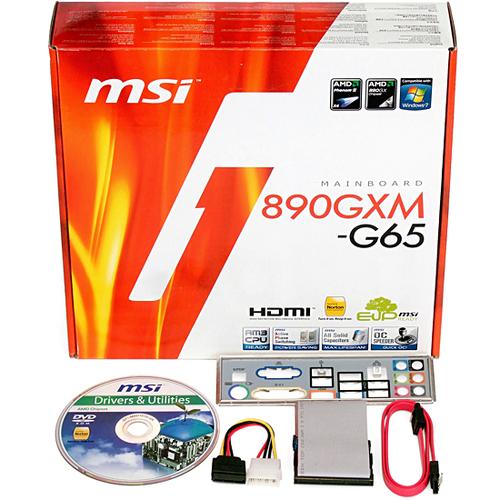
MSI 890GXM-G65


MSI was the only company to provide a microATX board for AMD's chipset launch, though this particular form factor is the most likely place to find an upper-range integrated-graphics chipset. Its 890GXM-G65 still provides most of the features of the full-sized Asus rival, minus an eSATA controller and two expansion slots.


The rear panel does contain a single eSATA connection, improved to the 6Gb/s standard because it uses the chipset's integrated controller. Like its rivals, the 890GXM-G65 also provides two USB 3.0 ports.

We think it's a little humorous that all three motherboards provide HDMI display output, but not DisplayPort, since this AMD-backed interface is found on so many Intel-based motherboards. Yet, this particular board will likely find its way into many home-theater systems, where HDMI is the most common HDCP-compliant standard.


The 890GXM-G65 actually looks like a compact game system motherboard with its short and fat heat pipe cooler, dual PCIe x16-length slots and electronic pathway switches for dual x8 or single x16 slot modes, and many among the AMD faithful will certainly see fit to use it as such. Game performance is an area where AMD processors remain competitive, though the chipset's Radeon HD 4290 integrated graphics will likely be of little use to value-seeking gamers.

The 890GXM-G65 lacks the FireWire controller builders rely on to activate the often-unused front panel connection of most media-center cases. Its forward-facing SATA ports are likewise unsuited for many of those cases, since the motherboard's front edge will often be blocked by drive bays. On the other hand, compact game system builders will often find its outward-facing SATA port blocked by the heatsink of large graphics cards, so it appears that MSI's only solution would have been to eliminate the Ultra ATA connector and try to place its SATA ports there.

Like Asus, MSI positions its front-panel audio connector in the motherboard's bottom rear corner. MSI moved it slightly forward, however, and we've encountered many builds where the extra inch solves cable installation woes.

BIOS


Reference Clock
190-690 MHz (1 MHz)
CPU Multiplier
Yes
iGFX Clock
150-1500 MHz (1 MHz)
DRAM Data Rates
REF x4-x8 (x1.33)
PCIe Clock
90-190 MHz (1MHz)
CPU Vcore
1.02-1.97V (10mV)
IMC Voltage
0.39-1.46V (1mV)
890GX Voltage
1.05-21.65V (6.25mV)
SB850 Voltage
0.89-1.40V (5.3mV)
DRAM Voltage
0.97-2.45V (~8mV)
CAS Latency
4-12 Cycles
tRCD
5-12 Cycles
tRP
5-12 Cycles
tRAS
15-30 Cycles

MSI applied full-sized overclocking features to its microATX 890GXM-G65, making it easy to extract peak performance from a portable gaming system. Underclocking is also possible, allowing reduced-noise cooling for "silent" PCs and media centers.


The 890GXM-G65 has a relatively broad selection of memory timings, which can be configured separately per-channel. MSI adds several drive-strength controls for enhanced stability when operating memory beyond its intended parameters.


Accessories


The 890GXM-G65 we received included an incomplete cable kit that doesn't support an SATA hard drive and optical drive simultaneously. While many builders have cables to spare, those who don't should take a second look at production samples to see if the package has been tweaked.

Powered by Zoundry Raven