At first glance, the Asus Eee PC 1201N looks virtually identical to several other 12 inch laptops from Asus including the UL20A and 1201HA thin and light laptops. But while the Asus Eee PC 1201N may have the same chassis as other Asus notebooks, it still breaks the mold in a few important respects.
This is the first notebook from Asus to offer NVIDIA ION graphics instead of the integrated Intel GMA 950 graphics that typically come bundled with first generation Intel Atom processors. Second, this is one of the only laptops on the market with a dual core Atom 330 processor. The CPU was initially designed for low-powered mini-desktop computers called nettops. But the Atom 330 is still a relatively low power CPU. And in the Eee PC 1201N it offers just a little bit of a performance boost, which helps this notebook to outperform other 11 and 12 inch notebooks with NVIDIA ION graphics and single core processors.
On the other hand, the Atom 330 is a bit more power-hungry than a single core Atom chip, and the Eee PC 1201N doesn't get the same kind of battery life I've come to expect from Atom powered notebooks.
The demo unit Asus sent me to review features a 12.1 inch, 1366 x 768 pixel display, a 1.6GHz Intel Atom 330 dual core CPU, NVIDIA ION graphics, 2GB of RAM, 250GB hard drive, and Windows 7 Home Premium. It has 802.11b/g/n WiFi and Bluetooth and a 0.3MP webcam.
Design
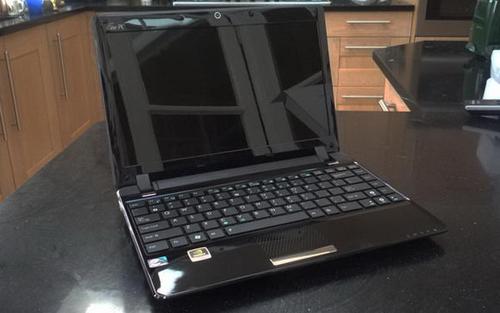
The Eee PC 1201N comes with either a black or silver case. The demo unit I received has a glossy black cover. The bottom of the computer has a matte finish, as does the battery, but the palm rest and bezel around the screen are the same glossy black plastic as the lid. It's attractive enough, until the shiny plastic starts to show your fingerprints.

The screen is also glossy, which means it can function as a mirror when the display is off. But while I wouldn't recommend using the Eee PC 1201N outdoors, the screen is bright enough to be used in most indoor settings. The 1366 x 768 pixel display is sharp and clear, without being too sharp. I'm not a big fan of high resolution displays on 10 inch netbooks, but this laptop's 12.1 inch screen is the perfect size for the HD screen. You can play 720p video in full screen mode and enjoy every last pixel.

The computer does get a little hotter than other 10 and 12 inch low power laptops I've tested. I'm betting that the combination of the dual core Atom 330 CPU and NVIDIA ION graphics are to blame, but the long and short of it is that I wouldn't recommend putting this notebook on your lap for an extended period of time while wearing shorts. But a good pair of jeans or thick trousers should protect you from the extra heat, which is most noticeable on the bottom of the computer. The keyboard and touchpad area don't get too hot.

On the bottom of the Eee PC 1201N you'll find a single access panel, which you can open to access 2 RAM slots. The notebook can handle up to 4GB of memory. The hard drive and other internal components are not easily accessible, so if you were hoping to swap out the HDD for an SSD or perform some other upgrades, you'll need to open up the laptop case.

Around the sides of the notebook you'll find VGA and HDMI outputs, as well as 3 USB ports, mic and headphone jacks, an SDHC card reader and an Ethernet port.

At the back of the laptop the battery sticks out a little bit from the base, which makes the Eee PC 1201N a tiny bit thicker at the rear than in the front.
Keyboard and TouchPad

The keyboard on the Eee PC 1201n is pretty much indistinguishable from the one on the Asus UL20A, which is to say I'm pretty happy with it. The island-style keyboard features flat keys with a little space between each key, making it easy to find the edges of the keys without looking down at the keyboard.
Because the Eee PC 1201N is a little larger than a typical 10 inch netbook, there's also room for a dedicated line of keys on the right side of the keyboard for PgUp, PgDn, Home, and End functions. The arrow keys in the bottom right corner double up as multimedia playback controls when you hold down the Fn button. And the Fn keys at the top of the screen allow you to adjust the volume, brightness, and several other settings.
Above the keyboard there are two buttons. You can press the one on the right to boot the PC. The button on the left toggles the touchpad. If you're using a mouse or watching a movie, you can turn off the touchpad. Just press the button again to turn it on.
The touchpad, at least on the unit I tested, is more like the one on the Eee PC 1005/1008 series of 10 inch netbooks than the Asus UL20A touchpad. It's made of the same black plastic as the palm rest area and has no physical border separating it from the palm rest. But the touchpad features a raised bumpy texture which provides a little friction and makes it easy to detect where the touchpad begins and ends.
There's a single wide button below the touchpad, with a rocker in the middle, allowing you press down on the left or right side to register a right of left click.
I found the touchpad reasonably easy to use, but I prefer the feel of the Asus UL20A touch area. The difference is that instead of raised bumps, the UL20A has small indents, or dimples.
Performance
The Eee PC 1201N isn't the first notebook with NVIDIA ION graphics to hit the market. But it is the first with ION graphics and a dual core Atom 330 CPU. And that makes a modest but noticable difference in everyday performance. While the HP Mini 311 felt a little sluggish when performing tasks that didn't take advantage of GPU-acceleration, the Asus Eee PC 1201N feels just as snappy as any Atom-powered netbook with a smaller screen.
For day to day tasks such as surfing the web over WiFi or editing documents, you'd be hard pressed to tell the difference between the sub-$500 Asus Eee PC 1201N and a much more expensive system. But when it comes to activities that put more strain on the CPU or GPU, the Eee PC 1201N excels in some areas and struggles in others.
For instance, the Asus Eee PC 1201N fared better than the HP Mini 311 in my app launching test, where I time how long it takes to load image editor GIMP 2.6.7 and office suite OpenOffice.org. But this computer wasn't as fast as the Asus Eee PC 1005PE with a single core Atom N450 processor, the Asus UL20A with a Core 2 Duo SU7300 CPU, or even the ASRock ION 330 nettop which is similarly outfitted with an Atom 330 CPU and NVIDIA ION graphics.
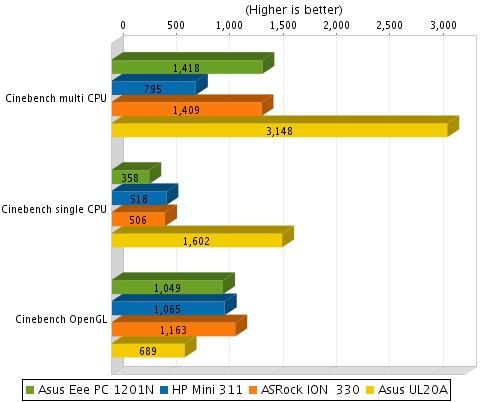
Another benchmarking tool, Cinebench tells a somewhat more complex story. This test measures single-core CPU and multi-core CPU performance as well as OpenGL graphics performance. The Eee PC 1201N came in dead last in the single-core test, but outperformed the HP Mini 311 notebook and ASRock ION 330 nettop in the multi-core test. The Asus UL20A with its dual core Core 2 Duo SU7300 CPU trounced all three in the CPU tests.
But where the NVIDIA ION platform really shines is in graphics performance. The Eee PC 1201N got the lowest score in the OpenGL test of any ION system I've tested to date, but it still came in far ahead of the Asus UL20A in this test.
In the 3DMark06benchmark, the Asus Eee PC 1201N bested the HP Mini 311 in every test, including the CPU and overall 3DMark score. It also came out ahead of the ASRock ION 330, even though the ION 330 notched a slightly better CPU score. And the Asus UL20A had the highest CPU score of all, but the integrated GMA 4500MHD graphics were no match for NVIDIA ION.
In other words, the Eee PC 1201N should have enough graphical prowess to play some modern 3D video games by offloading much of the heavy lifting to the graphics processor. But while the GeForce 9400M (ION) graphics blows away the integrated graphics Intel offers for its Atom and CULV chips, it's not exactly bleeding edge. If you plan to watch 1080p HD video, you don't really need anything more powerful than ION. If you want to play Modern Warfare 2 or Left 4 Dead 2, you might want to opt for a higher end system like the Alienware M11x.
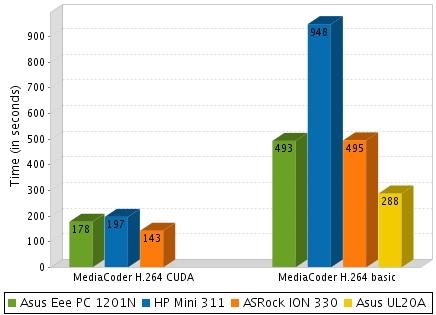
NVIDIA's ION platform also has another trick up its sleeve. NVIDIA's CUDA technology allows you to use the GPU to process some tasks that would normally be handled by the CPU. For instance, it took 8:13 to transcode a 4:34 video file using MediaCoder with a standard H.264 video encoder. When I used a CUDA-enabled encoder with MediaCoder, the time was cut to 2:58. That's on par with the results I got from the ASRock ION 330 and noticeably faster than the amount of time it took to transcode the same clip with the Asus UL20A (4:48) and HP Mini 311 (15:48 with the basic encoder and 3:17 with the CUDA encoder).
Battery
The notebook comes with a 6 cell, 63Whr, 5600mAh battery. I was only able to squeeze about 4 hours and 10 minutes of run time out of the Asus Eee PC 1201N while surfing the web with WiFi on. I suspect that number would be even lower if I was using the notebook to play games or watch videos.
The battery actually holds a bit more power than the 47Whr battery that ships with the Asus UL20A in the US. But due to differences in the processor and graphics, the UL20A actually runs for longer on a charge than the Eee PC 1201N. The Eee PC UL20A has a dual core Intel Core 2 Duo SU7300 CPU and integrated GMA 3150 graphics, while the Eee PC 1201N has a dual core Atom 330 CPU and NVIDIA ION graphics.
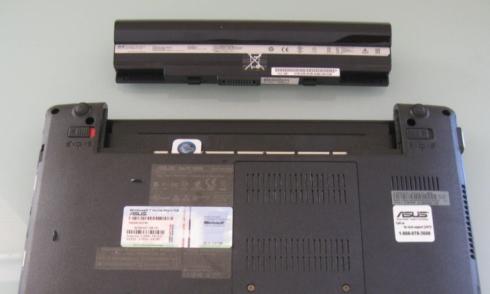
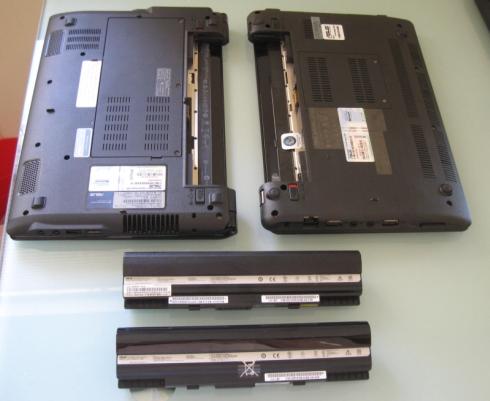
As I discovered recently, it turns out the batteries for these two notebooks are interchangeable, so if you're looking for a higher capacity battery for your UL20A, you might want to consider looking for a 1201N replacement battery. I suppose you could also use a UL20A battery in your Eee PC 1201N if you want less battery life, but I don't see any good reason to do that.
Verdict
The Asus Eee PC 1201N is the first notebook with an Atom processor and NVIDIA ION graphics that I've tested that doesn't feel slower than a typical 10 inch Atom powered netbook at day to day tasks. Sure, the HP Mini 311 and other ION-powered systems can play modern video games and stream HD video. But they're kind of sluggish for web browsing. That's not true with the Asus Eee PC 1201N, which is likely due to the dual core Atom 330 CPU.
But if you're primarily looking for a machine for surfing the web, you might want to consider a smaller netbook with an Atom N450 processor or an 11 or 12 inch model with a CULV processor. Both options are likely to net you significantly better battery life. The reason to consider the Eee PC 1201N is if you want a notebook with decent everyday performance, and above average graphics capabilities.
When it comes to HD video playback and handling 3D graphics, the Eee PC 1201N comes out significantly ahead of the Asus UL20A and similar notebooks with CULV processors. And if you're looking for a budget ultraportable that can handle some modern gaming, you're not likely to find one that comes much cheaper than the Eee PC 1201N, which sells for under $500

on Amazon.


 Use of the retail AMD boxed cooler in September’s $400 PC capped performance gains from overclocking and unlocking the Athlon II processor. This time we chose an aftermarket cooling solution that was affordable and left greater headroom for pushing voltage and core speed.