Huawei API v4.0
IMEI :
Showing posts with label Toshiba. Show all posts

Saturday, April 3, 2010

The Best Gaming Laptops Under $1000

Best Gaming Laptop for $550


TOSHIBA Satellite L505-S5995


Specifications:

  • Brand and Model: Toshiba Satellite L505-S5995
  • Screen Size/Resolution: 15.6″, 1366 x 768 WideScreen
  • Video Card: ATI Radeon HD 4570 512MB DDR3
  • Processor: Intel Pentium Dual-Core T4300 (2.10GHz, 800MHz FSB, 1MB L2 Cache)
  • Memory (RAM): 3GB DDR2
  • Hard Drive: 250GB 5400rpm
  • Optical Drive: 24X CD Read/Burn, 8X DVD Read/Burn
  • Connectivity: 802.11 b/g/n Wireless, 10/100Mbps LAN
  • Ports: 3 USB, 1 VGA, 1 E-SATA, SD Cards, Webcam
  • Battery: 4000mAh (6 cell) Lithium Ion
  • Dimensions and Weight: 15.1″ x 10.2″ x 1.4-1.55″, 6lbs
  • Operating System: Windows 7 Home Premium
  • Warranty: Parts and Labor - 1 year limited

About the Toshiba Satellite L505-S5995:

This is the least expensive laptop that is able of handling some video games. Considering the price, don't expect the best looking or the most powerful laptop with tons of accessories, but instead expect an honest laptop with the bare necessities.

The video card limits you to older games and some less demanding recent games, but with lowered details.More information on the Radeon 4570. This laptop is best suited for you if you are very limited on cash and only intend on playing older games or occasionally more recent games that are less demanding.


Pros:
  • Least expensive gaming laptop
  • E-SATA port

Cons:


  • Weak Video Card, limiting you to pretty much only older games or a few recent games that are not too demanding, but with details at the minimum.
  • Low storage capacity (250GB)
  • Only 3GB of RAM
  • Lan limited to 100 Mbps
  • Only 3 USB ports and no HDMI output

Best Gaming Laptop for $650


ASUS K61IC-X2


Specifications:
  • Brand and Model: ASUS K61IC-X2
  • Screen Size/Resolution: 16″, 1366 x 768 WideScreen
  • Video Card: NVIDIA GeForce GT 220M 1GB DDR2
  • Processor: Intel Pentium Dual-Core T4300 (2.10GHz, 800MHz FSB, 1MB L2 Cache)
  • Memory (RAM): 4GB DDR2
  • Hard Drive: 320GB 5400rpm
  • Optical Drive: DVD/CD Burner - SuperMulti
  • Connectivity: 802.11 b/g/n, 10/100/1000Mbps LAN
  • Ports: 4 USB ports, 1 VGA, 1 HDMI, 5 in 1 Card Reader, 1.3MP Webcam
  • Battery: 6 cell Lithium Ion
  • Dimensions and Weight: 14.8″ x 10.24″ x 1.3-1.4″, 5.7lbs
  • Operating System: Windows 7 Home Premium
  • Warranty: 1 year ASUS Accidental Damage Warranty - Drops, Fire, Spill, Surge
  • Parts and Labor - 2 years limited

About the ASUS K61IC-X2: A nice step-up in looks, power and ports. While it is more powerful than the $550 Toshiba laptop, it still limits you to older games or recent games that are not too demanding with lowered details.


Pros:


  • Good Price for the features offered
  • 4 USB ports and HDMI output for your monitor or large HDTV
  • Rather light for a Gaming Laptop
  • ASUS Warranty
  • Unique Cooling System that keeps the laptop cooler and more silent. In simple terms, it uses two fans instead of one.

Cons:


  • Video Card is not powerful enough for modern games.
  • Slow 5400rpm Hard Drive

Best Gaming Laptop for $750


HP Pavilion dv6-1362nr


Specifications:


  • Brand and Model: HP Pavilion dv6-1362nr
  • Screen Size/Resolution: 15.6″, 1366 x 768 WideScreenLED Baclight
  • Video Card: ATI Radeon 4650 1GB
  • Processor: Intel Core 2 Duo T6600 (2.20GHz, 800MHz FSB, 2MB L2)
  • Memory (RAM): 4GB DDR3
  • Hard Drive: 320GB 7200rpm
  • Optical Drive: LightScribe SuperMulti 8X DVD±R/RW
  • Connectivity: 802.11b/g, 10/100/1000 LAN
  • Ports: 4 USB, 1 E-SATA, VGA and HDMI, ExpressCard/54 slot, IR Remote
  • Battery: 6 cell Lithium Ion
  • Dimensions and Weight: 14.90″ x 10.15″ x 1.33″ - 1.61″, 6.34lbs
  • Operating System: Windows 7 Home Premium 64-bit
  • Warranty: Parts and Labor - 1 year limited

About the HP Pavilion dv6-1362nr:

Finally, we have a laptop with a better video card, capable of handling most DirectX 9 games (like Call of Duty 4, F.E.A.R., or Unreal Tournament 3) should be playable in low to medium detail. Demanding DX10 games from 2008 like Crysis run only in low details fluently.

The Mobility Radeon HD 4650 includes the Avivo HD called video technology including an onboard soundchip for 7.1 sound output over HDMI. The Avivo HD technology handles all video tasks and enables the GPU to decode HD videos.

Pros:


  • Decent Gaming Performance thanks to the Radeon HD 4650
  • Nice Looking
  • Faster Hard Drive, at 7200rpm.
  • Remote Control for MultiMedia
  • 4 USB and HDMI output for your monitor or large HDTV
  • 7200rpm Hard Drive

  • Cons:

    No 802.11n wireless

Best Gaming Laptop for $800


ASUS X83VP-X1


Specifications:


  • Brand and Model: ASUS X83VP-X1
  • Screen Size/Resolution: 14.1″, 1280 x 800 WXGA
  • Video Card: ATI Radeon HD 4650 1GB DDR3
  • Processor: Intel Core 2 Duo T6600 (2.20GHz, 800MHz FSB, 2MB L2 Cache)
  • Memory (RAM): 4GB DDR2
  • Hard Drive: 320GB 7200rpm
  • Optical Drive: DVD/CD Burner - SuperMulti
  • Connectivity: 802.11b/g/n, 10/100/1000 LAN
  • Ports:5 USB, 1 VGA, 1 HDMI, 1 eSATA, 8-in-1 card reader, 1.3MP webcam
  • Battery: 6 cell Lithium Ion
  • Dimensions and Weight: 14.52″ x 10.52″ x 1.42″, 5.5lbs
  • Operating System: Windows 7 Home Premium 64-bit
  • Warranty: 1 year ASUS Accidental Damage Warranty - Drops, Fire, Spill, Surge

    Parts and Labor - 2 years limited

About the ASUS X83VP-X1: While this ASUS laptop has the same processor and video card as the previous HP Pavilion dv6-1362nr model, it's more portable due to its smaller size and lower weight.

Like the HP Pavilion dv6-1362nr, it is capable of handling most DirectX 9 games (like Call of Duty 4, F.E.A.R., or Unreal Tournament 3) should be playable in low to medium detail. Demanding DX10 games from 2008 like Crysis run only in low details fluently.The Mobility Radeon HD 4650 includes the Avivo HD called video technology including an onboard soundchip for 7.1 sound output over HDMI. The Avivo HD technology handles all video tasks and enables the GPU to decode HD videos.

Also, it's lower resolution of 1280 x 800 actually gives this laptop the edge for video games performance compared to the HP Pavilion dv6-1362nr. Why? The lower resolution means that the video card doesn't have to work as hard, which in the end means you'll have higher framerates.


Pros:


  • Decent Gaming Performance thanks to the Radeon HD 4650
  • Lower Resolution brings higher framerates
  • 5 USB Ports and HDMI output for your monitor or large HDTV
  • 7200rpm Hard Drive
  • Light for a Gaming Laptop

Cons:


  • DDR2 RAM, draws more power, more expensive to upgrade

Best Gaming Laptop for $970


ASUS X83VP-A1


Specifications:


  • Brand and Model: ASUS X83VP-A1
  • Screen Size/Resolution: 14.1″, 1280 x 800 WXGA
  • Video Card: ATI Radeon HD 4650 1GB DDR3
  • Processor: Intel Core 2 Duo P8700 (2.53GHz, 1066MHz FSB, 3MB L2 Cache)
  • Memory (RAM): 4GB DDR2
  • Hard Drive: 500GB 5400rpm
  • Optical Drive: DVD/CD Burner - SuperMulti
  • Battery: 6 cell Lithium Ion
  • Connectivity: 802.11b/g/n, 10/100/1000 LAN
  • Ports: 5 USB, 1 VGA, 1 HDMI, 1 eSATA, 8-in-1 card reader, 1.3MP webcam
  • Dimensions and Weight: 14.52″ x 10.52″ x 1.42″, 5.5lbs
  • Operating System: Windows 7 Home Premium 64-bit
  • Warranty: 1 year ASUS Accidental Damage Warranty - Drops, Fire, Spill, Surge

    Parts and Labor - 2 years limited

About the ASUS X83VP-A1: In looks, it is identical to the ASUS X83VP-X1. However, inside it contains a much more powerful CPU and is equipped with a larger 500GB Hard Drive, although it is slower at 5400rpm.

In video games, the more powerful processor will help gain a few extra frames per second. However, that doesn't justify spending $170 more, just for that. This laptop is meant for you and worth the extra $170 if, on top of video games, you do some audio/video/3D editing or multi-task a lot.

Pros:


  • Equipped with the more powerful Intel Core 2 Duo P8700 CPU, at 2.53GHz, 1066MHz FSB and 3MB of L2 cache.
  • Decent Gaming Performance thanks to the Radeon HD 4650
  • Lower Resolution brings higher framerates
  • 5 USB Ports and HDMI output for your monitor or large HDTV
  • Light for a Gaming Laptop

Cons:


  • Slow 5400rpm Hard Drive
  • DDR2 RAM, draws more power, more expensive to upgrade

Powered by Zoundry Raven

Sunday, March 7, 2010

Maximum Efficiency: Build A 25W Performance PC Using Core i5


Back in late 2008, we ran an article showing how an efficient power supply, low-end motherboard, and entry-level Core 2 Duo could reach less than 40W system idle power. Then we took the test config and proved that a Core 2 system provides power consumption similar to that of a cheap, Atom-based desktop solution, even busting Atom in performance per watt. The introduction of the Core i5/i3 Clarkdale dual-cores with the H55/H57 chipset and on-package integrated graphics marks the next step. Systems at 30W and less are now within reach for everyone. We wanted to go even lower this time around and set 25W as the target-but at zero compromise


Why Do I Care?

I should clarify that (apart from a discussion about global environment concerns) there's no urgent need to achieve the lowest power consumption possible on your desktop PC. This is is an optional and voluntary item. An average desktop PC requires between 45W and 60W, as long as it's employing integrated graphics and mainstream components. If you add powerful graphics and more capable hardware, you'll be at 80W and up. In this context, 50W is perfectly okay for a modern PC without serious 3D graphics. But why not pay attention to system power if it doesn't cost anything or jeopardize performance or features?


A 30W (versus 50W or higher) system idle power draw will mean only small savings on your energy bill, but it will introduce some added advantages. The most important of these certainly is the drop in required cooling. A 30W idle translates into slower-spinning fans, both on the processor and throughout the system. Another direct advantage is lower noise levels, as temperature controlled coolers have less work to do. Even passively-cooled PCs are clearly within range at 30W, although such systems typically come at a price premium.

25W PC Idle Power

Reaching almost 30W system-wide idle power was possible with Core 2 Duo when using a motherboard with integrated graphics and an efficient power supply. Of course, such a system could only deliver mainstream performance, and almost always entailed a reduced feature set. For example, G31 integrated graphics might only sip a few watts, but the IGP was already old fashioned at the time of our original article.

Today's 25W idle power target is obtainable thanks to the new Core i3/i5 Clardale-based processors and the H55/H57 chipset. This platform offers the best overall efficiency today. With additional measures, such as slight undervolting or smart component choices, we could actually go even lower. However, it's amazing that we can reach such low system power without jeopardizing performance or features.

Naturally, you won't get quad-core performance and 3D graphics horsepower; we're talking about mainstream components, the performance you'd expect from a dual-core CPU, and premium features. Let's have a look at no-compromise computing at unbelievably low power.


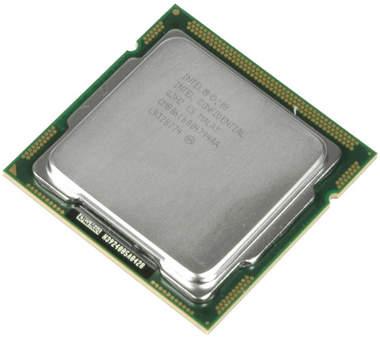
Still fresh out of Intel's starting blocks, the Clarkdale-based 32nm dual-core CPU with an on-package 45nm graphics/memory controller has made quite a good impression with regard to performance. The family from which the -661 hails remains controversial though, mainly because of its steep pricing. AMD offers much better value per dollar, and the direct comparison of AMD's existing dual-core CPUs against Intel's new ones was perceived as largely unfair. We'll be following up with more articles and value comparisons of AMD and Intel in the following weeks.

We again used the Core i5-661 here, since it is the premium graphics-focused flagship in the i5 lineup, running the IGP at 900 MHz instead of the 733 MHz found on all other Core i5 and Core i3 models. The result is a TDP of 87W, rather than 73W (although we found that the processor typically doesn't get too close to its maximum thermal ratings). Yet the CPU, combined with MSI's H57M-ED65 motherboard was low enough on power to reach the 25W idle limit we desired.

The H57M-EG65 is a mainstream H57 motherboard in microATX format. Important enthusiast features include a dynamic eight-phase voltage regulator, a massive heatpipe, twin x16 PCI Express slots (though remember, Clarkdale-based processors cannot divide their 16 PCIe lanes on an H55/57 motherboard), unofficial DDR3 support up to 2,133 MT/s, RAID 5 support, and MSI's overclocking assistant, OC Genie. MSI exposes HDMI, DVI, and D-Sub display outputs, as well as an eSATA port for external high-speed storage devices.

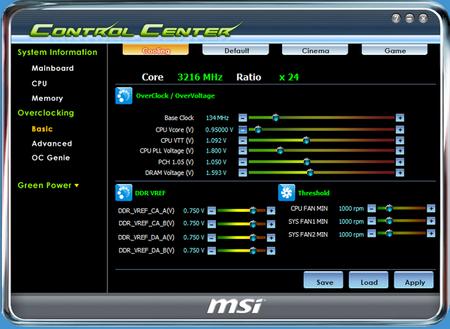
Still, we missed the ability to reduce component voltages in the board's BIOS. This would be necessary to reduce power consumption at stock speeds. Half a year ago, we reduced the core voltage on AMD and Intel systems and achieved impressive power savings. The same could be done on the modern Clarkdale-based chips as well. Nevertheless, we took the easier path of using MSI's ControlCenter to reduce the processor voltage.


Step 1: An Efficient Power Supply


We've been using the 750W Silencer from PC Power and Cooling for a long time because it offers enough output for a majority of the configurations we test on a daily basis here in the lab. It is an 80 PLUS device, but it's not the right choice for a low-power computer for a very simple reason: power switching circuits are typically only efficient within a certain output range.

For this reason, the 80 PLUS specifications define efficiency for three different load scenarios. In a simple example, 80 PLUS Gold requires 87% efficiency at 20% of the nominal load, 90% efficiency at 50% load, and 87% efficiency at full output. In the case of our 750W Silencer, 20% load equals 150W-a level we want nothing to do with on our test system. Clearly, we needed a different PSU for this project.


This small 220W power supply by FSP/Fortron is also an 80 PLUS device. Its small capacity may not make it seem attractive at first, but a 20% load equals 44W-much closer to where we want to land. Check out the results of this simple component exchange in the results section on the following pages. This measure alone was the most important step in power consumption reduction, moving the system from 33W idle to only 26W idle.

Step 2: Undervolting


We decided to tweak the CPU core voltage and introduce a minor Vcore reduction to see if we could make another impact on power consumption. Experience tells us that a few percent voltage reduction typically doesn't lead to stability issues. However, excessive undervolting can certainly be problematic, and insufficient voltage supply can be complex and tricky to identify. If you aren't sure, we recommend staying close to the default voltage to avoid unneccessary issues.


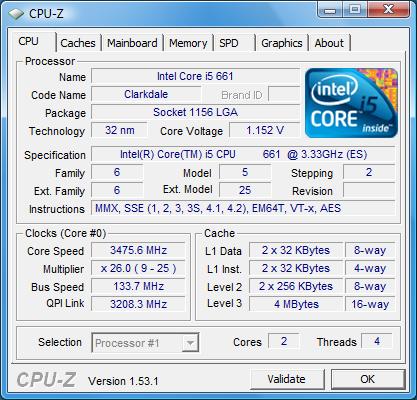
MSI's ControlCenter tells us that the default voltage for our test system is 0.95V (idle). CPU-Z confirms the setting and tells us that it's effectively 0.944V.


We decided to adjust the voltage from 0.95V to 0.90V in the ControlCenter software.


The result was an effective CPU voltage of 0.888V at idle.


Load Vcore Readings


Peak Vcore at default auto settings.


Here's the peak Vcore at 0.9V manual setting.

We measured a decrease in system power at the reduced settings, but the impact was negligible at idle. At peak load, we had a decrease from 80W to 76W total system power.

Step 3: An Efficient Hard Drive


There are still a few components left to optimize: the main memory and the hard drive. We tried removing one of the two DIMMs, but since DDR3 memory uses less power than DDR2, the impact was extremely small-doubly predictable, since we were running the DDR3 at 1,333 MT/s and default voltage. However, we have room to drop consumption versus the Western Digital VelociRaptor in our reference system, since it was never designed to be a low-power component.


We received Toshiba's newest 640GB 2.5" hard drive, the MK6465GSX, at about the same time we completed this review. Since its power consumption is among the lowest seen in today's hard drives, we decided to use it instead of a faster 3.5" desktop drive.

The 5,400 RPM Toshiba helped deliver additional power savings. System idle power went from 26W with the undervolted system on the 220W FSP power supply to as little as 23W. That put us under the 25W target for which we were aiming. The difference at peak load is only two watts, but we're getting close to the accuracy limits of our measuring equipment at this point. The MX6465GSX is also available in 160, 250, 320, and 500 gigabyte capacities. A detailed review of the new 640GB drives will follow soon.

Of course, a solid state drive is also an option here, but the limited capacity would be an issue for most folks, and the increased cost would push the value of this build in the wrong direction. For that reason, a 2.5" mobile drive with more room for storage makes the best sense.

Test Setup And Power Consumption Results


System Hardware


Hardware


Details


Motherboard (LGA 1156)


MSI H57M-ED65 (Rev. 1.0)


Chipset: Intel H57, BIOS: 1.0B28 (04/01/20100)


CPU Intel


Intel Core i5-661 (32nm, 3.33 GHz, 2 x 256KB L2 and 4MB L3 Cache, TDP 87W, Rev. B1)


RAM DDR3 (dual)


2 x 2GB DDR3-1600 (Corsair CM3X2G1600C9DHX)


Graphics


Intel HD Graphics


Hard Drive I


Western Digital VelociRaptor, 300GB (WD3000HLFS), 10,000 RPM, SATA 3 Gb/s, 16MB Cache


Hard Drive I


Toshiba MK6465GSX, 640GB, 2.5," 5,400 RPM, SATA 3 Gb/s, 8MB Cache


Power Supply I


PC Power & Cooling, Silencer 750EPS12V 750W


Power Supply II


Fortron FSP220-60LE 220W


System Software & Drivers


Operating System


Windows Vista Enterprise Version 6.0 x64


Service Pack 2 (Build 6000)


Drivers and Settings


Intel Chipset Drivers


Chipset Installation Utility Ver. 9.1.1.1025


Intel Storage Drivers


Matrix Storage Drivers Ver. 8.8.0.1009


Results: Idle and Peak Power


We started off at 33W idle power, which is low but not revolutionary. We then exchanged the high-power PSU with a more efficient one.

The most important thing in this measurement is the fact that we aligned the PSU's output to the expected system power consumption as much as possible. A 750W PSU running at only 40W load would be pretty inefficient. For this reason, the idle power decreased from 33W to only 26W. Even our small voltage decrease didn't make much of a difference . The only other step that had an impact was the use of Toshiba's 640GB 5,400 RPM hard drive instead of the high-performance WD VelociRaptor. Ultimately, we dropped from 33W to 23W with only two component changes. This is a 30% reduction in idle power.


Peak power doesn't differ that much, as even the 750W Silencer power supply is operating at much more efficient levels. This is why its replacement doesn't make as much of a difference under a heavy load. The voltage tweak, however, did make a difference of 4W. Another 2W could be saved through the more efficient hard drive.

Overall, the total impact on peak power is less significant than the change in idle power. This is where a desktop-class build will be significantly more power-hungry than a machine centering on Intel's Atom CPU. However, most desktops will spend little time using this much juice. In return, they also finish the same tasks in less time.

Benchmark Results: Efficiency (Performance Per Watt)


Once again, we ran our efficiency suite, which consists of several scripted benchmarks.


Since we keep tracking power in one-second intervals, we can calculate the average power used for the entire workload. The difference is significant considering that the performance does not change. All we're doing is modifying components and voltage settings in an effort to decrease power consumption.


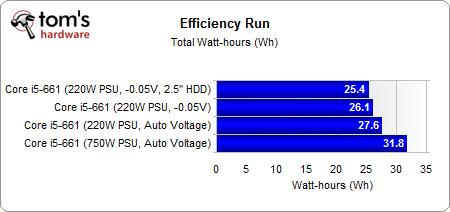
The results on total power used for this test run are similar to the average readings.


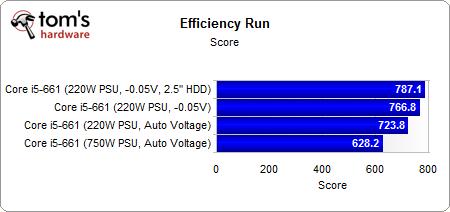
The total runtime is one form of a performance result. As you can see, the results are very similar for the first three configurations. The last test run, which was conducted with the slower but more efficient Toshiba 2.5" hard drive, delivers less overall performance due to the decreased disk performance.


We divided the performance result by the power used to get our efficiency score. As expected, efficiency increases quite a bit.


The efficiency diagram visualizes power consumption at every point of the benchmark run and also shows differences in runtime.

Conclusion


We expected that it would be hard to get the Core i5-661 system to run at only 25W idle power, but it turned out that the entire project was pretty easy to execute. Our test results show impressively that matching the power supply to your expected output (with some power reserves, of course) is imperative. Replacing the high-output 750W PC Power and Cooling PSU, which is a neat piece of hardware for a high-end gaming rig, with a low-power 220W PSU made the largest difference in our efforts to lower system power. Everything else is secondary. VoilĂ -26W reached with zero performance impact.

22-28W Idle Power is Realistic

We tried running the system with only one DDR3 DIMM module instead of two, but found that the savings are below 1W. At the same time, this measure would have had a noticeable impact on performance. This also applies to the hard drive, but we were able to save an additional 2W to 3W there. Still, even if you only pick a suitable power supply and optimize component voltage, it's absolutely possible for anyone to recreate our 25W build-assuming that you go for the latest mainstream 32nm Intel hardware and a motherboard with the H55/H57 chipset. The voltage reduction reduced peak power, but had little impact on idle power.

And Now?

Let me come back to the question of why this is relevant. For power users, it really isn't. You'll probably go straight to a quad-core machine and not bother with power consumption questions. For average users, it becomes relevant if you want to go for a low noise system, or if you intend to pair high performance with the lowest possible acoustic footprint. This is typical of an HTPC, living room machine, or home server application. Keep in mind that a 3+ GHz Core i5 dual-core system is significantly faster than any other dual-core configurations around. It's finally possible to get strong performance at the power consumption levels of a dreadfully-slow Atom machine.

Intel's Low Power Platform Means Higher Cost

However, there is a significant catch: you have to be aware that the new Intel platform is not a bargain. The processors are expensive, especially if you look at AMD's pricing in comparison. Obviously, AMD has to stay aggressive on pricing to remain competitive from a performance perspective, but the result really makes you wonder. Do you really need to spend several hundred bucks on a Core i5 solution to reach the lowest power, or will an AMD solution at half the cost, but higher power consumption, be more suitable? We've made it clear that energy cost isn't really an issue at this low level. If you want to go for the lowest power, for whatever reason, Clarkdale-based Core i5 processors paired with suitable components are unbeatable. They're just expensive relative to the competition, which is why we continue to recommend the i5-750 to enthusiasts at the $200-ish price point where you find the i5-661.

Powered by Zoundry Raven